
zmermaid
I finally got zmermaid to a point where I consider it usable. 403 KB compressed.
It is a small, self-contained library written in Zig that takes Mermaid syntax and produces SVG.
No Mermaid runtime, Node.js, Java, ELK, server, or pile of downloaded assets is needed.
It can run directly in a browser as WebAssembly or as a native library, with JavaScript, C, and Zig APIs.
Project: https://github.com/t90/zmermaid
Minimal HTML + JavaScript example
<!doctype html>
<html>
<body>
  <div id="diagram"></div>

  <script type="module">
    import { createRenderer } from "./web/zmermaid.mjs";

    const wasmBytes = await fetch("./zmermaid.wasm")
      .then(r => r.arrayBuffer());

    const renderer = await createRenderer(wasmBytes);

    const svg = renderer.render(
      "flowchart LR; A[Input] --> B[SVG]",
      { theme: "dark", idPrefix: 1 }
    );

    document.getElementById("diagram").innerHTML = svg;
  </script>
</body>
</html>
Go 1.23 iterators
This summer, the Go team introduced new iterators, which, naturally, stirred up some controversy. Critics argued the design wasn’t very "Go-like"—too functional, too complex, and missing Go’s typical simplicity. A common complaint was: why not just introduce an iterator interface and allow range operations over it?
I get the criticism, and I agree to an extent. But the decision to go with push iterators over pull iterators makes sense too. It simplifies common tasks—like iterating over a database cursor—in a way that’s easier to write and follow than managing an iterator state machine.
For a function to act as an iterator, it has to follow one of three signatures:
func(func() bool)
func(func(K) bool)
func(func(K, V) bool)
And here’s the first challenge: you end up writing a function that returns another function, which takes yet another function. It’s a bit of a nesting doll situation.
Let’s break it down with this example:
func rangeIterating(it iterator[int]) func(func(int) bool) {
	return func(next func(int) bool) {
		for it.Next() {
			if !next(it.Value()) { // handle break
				println("break")
				return
			}
			println("loop")
		}
	}
}
So, what’s calling what? What’s returning what? You’ve got a function (rangeIterating) that returns another function, which takes a function (next) as an argument. Inside, next gets called on each value from the iterator. It’s a mess of indirection: a function calls a function, which returns a function. It’s like untangling a pair of headphones you swore you left neatly coiled.
To make matters worse, in some examples they call the parameter function yield, which immediately clashes with languages like C#, Python, or JavaScript—where yield is a keyword that suspends and resumes execution.
Let’s simplify it by recreating for range behavior:
func myForEach(iterFunc func(func(int) bool), valueMapFunc func(int) bool) {
	iterFunc(valueMapFunc)
}
All this function does is call the provided iterator function (iterFunc) with a valueMapFunc as its argument. The valueMapFunc is simple: it returns false when there’s a break in the loop, and true in all other cases.
Here are two snippets that essentially do the same thing:
it := &IntIterator{0}

for val := range rangeIterating(it) {
	if val > 2 {
		break
	}
	println(val)
}
it := &IntIterator{0}
myForEach(rangeIterating(it), func(val int) (falseIfBreak bool) {
	falseIfBreak = true
	if val > 2 {
		falseIfBreak = false
	}
	println(val)
	return
})
So, yes, the new for range loop isn’t iterating over a collection itself. Instead, it expects the iterator function to handle the looping. The for range just receives values via the value mapping function. The iteration logic is offloaded to the iterator, with for range acting as a receiver for whatever values the iterator decides to pass along.
Here’s a full sample you can play with:
package main

type iterator[T any] interface {
	Next() bool
	Value() T
}

type IntIterator struct {
	Val int
}

func (it *IntIterator) Next() bool {
	it.Val++
	return it.Val < 10
}

func (it *IntIterator) Value() int {
	return it.Val
}

func rangeIterating(it iterator[int]) func(func(int) bool) {
	return func(next func(int) bool) {
		for it.Next() {
			if !next(it.Value()) { // handle break
				println("break")
				return
			}
			println("loop")
		}

	}
}

func myForEach(iterFunc func(func(int) bool), valueMapFunc func(int) bool) {
	iterFunc(valueMapFunc)
}

func main() {

	it := &IntIterator{0}

	for val := range rangeIterating(it) {
		if val > 2 {
			break
		}
		println(val)
	}

	it.Val = 0

	myForEach(rangeIterating(it), func(val int) (falseIfBreak bool) {
		falseIfBreak = true
		if val > 2 {
			falseIfBreak = false
		}
		println(val)
		return
	})

}
In the end, we didn’t really gain any groundbreaking capabilities with this change. I still wish we had something cleaner, like:
for k, v := range iteratorStruct {
}
But we’re still have:
for iteratorStruct.Next() {
}
And let’s be honest—this is still way better than the C++ iterator interface. Go’s approach might feel a little unconventional, but at least it’s easy to implement and far less painful than C++’s monstrosity.
Automating Local Processes with Ollama
Since the release of GPT-3, large language models (LLMs) have become integral to daily life. When OpenAI introduced a user-friendly chat interface, many jumped to predict the end of human involvement in various professions: software development, writing, editing, translation, art, even CEO, CFO CTO roles. While some still cling to these predictions, it's unlikely to happen anytime soon. However, LLMs are undeniably valuable tools.
Can LLMs Help with Software Development?
The simplest answer is to use something like GitHub CoPilot, which writes code for you. I've tried it and wasn't blown away. Sure, it can produce code better than a lot of low-quality attempts I've seen in over 20 years in the industry, but it's far from the best. Its output is mediocre, but does it really need to be perfect? Is it even solving the right problem? Is writing the code even the main bottleneck in software development? Not really. Most of a developer's time is spent reading code and navigating organizational hurdles, comprehending system design, looking for a defect in a system that does not produce any logs but still runs on production, not typing code. And yes, maybe some of those problems will be addressed with more advanced frameworks like AutoGen
While CoPilot can bridge gaps in a developer’s API knowledge, it struggles to keep up with the latest changes in packages. Microsoft is working hard to address this, but it remains a weak point. In my experience, CoPilot's autocomplete is inconsistent, and I often found myself spending more time fixing its output than thinking critically about the problem I was trying to solve. All this, coupled with the high price tag, left me unimpressed. Microsoft likely doesn’t even break even with what they charge, so expect prices to rise as the service matures.
Privacy Concerns
Another issue with specialized tools like CoPilot is privacy. Sure, there's a EULA, but in most cases, sensitive data needs explicit authorization to leave a protected environment for anything beyond hobby projects. CoPilot isn’t ideal in this regard. IntelliJ's recent attempts at local models are noble. same applies to everything that was done for VIM and Emacs (ok, ok... for VS Code too).
Flexibility and Customization A final frustration is how these models are locked into specific use cases. If your needs deviate from the product manager’s roadmap, you're stuck. Wouldn't it be nice if you could have a model that works in any custom scenario, without navigating API limitations?
This brings us to Ollama.
Why Ollama?
What if we had a tool that accepted any text input via stdin and produced stdout like traditional UNIX utilities—grep, awk, sed—but with some intelligence applied? That's where Ollama comes in. It's been around for a while, and many developers already use it.
Getting Started with Ollama
To install it on Linux:
curl -fsSL https://ollama.com/install.sh | sh
On Windows and macOS, head to Ollama's homepage, download the installer, and follow the standard process. (At the time of writing, there’s no Chocolatey package, and I haven’t checked Homebrew.)
Once installed, you can run:
ollama run mistral
This downloads around 4GB of pre-trained model weights and starts a session with the Mistral model, which I’ve found to be solid for software development tasks.
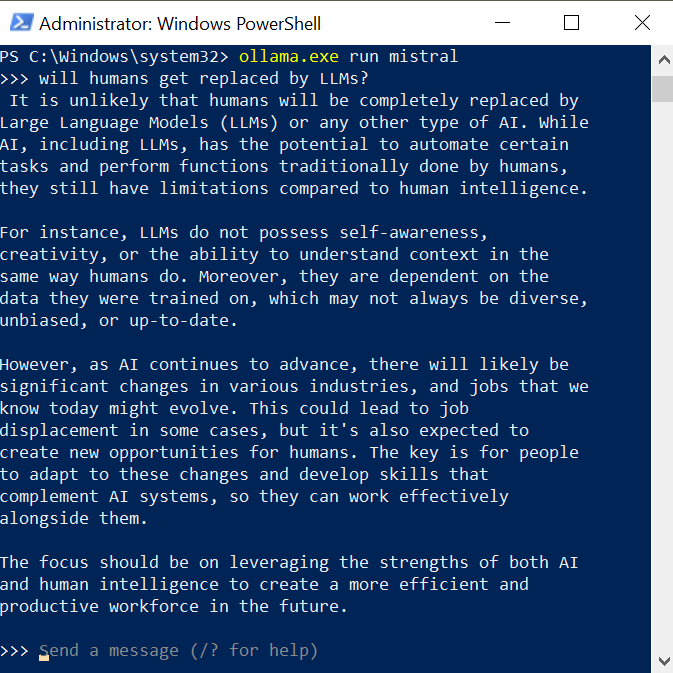
But this is old style fun, just without web interface, how about that serious bash scripting?
Let's start with something simple like
echo "`git diff goGet.go` write a message for git log using only the data you were provided" | ollama.exe run mistral

I take git diff for a file and supplement it with a direction to the model, and the result is not bad. Much better than a log of messages in git log I saw. So no more generic change messages?
But can it be even better? Let's set a mark to the quality of the comment:
DIFF=`git diff goGet.go`
GITLOG=`echo "$DIFF write a message for git log using only the data you were provided" | ollama.exe run mistral`
SCORE=`echo "Score 1-10 if this is an informative git log message. Use only this data and return only one number. Don't explain. $GITLOG" | ollama.exe run phi3:medium`
echo "$SCORE"
And I got result 7 on a first run, 8 on the second. I can keep trying until its perfect or settle for anything less than that. And all of that can be done hands-off.
So sky is the limit.
Wait, but what if my machine (a laptop) is too weak to run a decent model like phi3:medium, or even the small ones take forever to generate? Am I out of luck and have to depend on greedy API providers?
First of all, you can use something like an external GPU if your machine supports either
- Thunderbolt 3+
- Oculink
- Has one unused nvme ssd m.2 port
get a GPU with as much VRAM as you can afford and enjoy.
What if my machine does not support any of that?
You can always run ollama server on a different machine. It is controlled with an environment variable
OLLAMA_HOST=hostname:port
You can make ollama available within your protected network by setting simple magic in your nginx (DON'T use that on production)
        location / {
                proxy_pass http://localhost:11434;
                proxy_set_header Host 127.0.0.1;
                proxy_set_header X-Real-IP $remote_addr;
                proxy_set_header X-Forwarded-For $proxy_add_x_forwarded_for;
        }
And for a server you can get anything starting from a used laptop or a desktop that you can get for cheap, or you can rent hardware from cloud providers (which is more convenient, but hugely more expensive)
And yes. Ollama exposes REST api that you can use. But that is simply stated on their own documentation page.
curl http://localhost:11434/api/generate -d '{
  "model": "llama3.1",
  "prompt":"Why is the sky blue?"
}'
Automating Local Processes with Ollama
Since the release of GPT-3, large language models (LLMs) have become integral to daily life. When OpenAI introduced a user-friendly chat interface, many jumped to predict the end of human involvement in various professions: software development, writing, editing, translation, art, even CEO, CFO CTO roles. While some still cling to these predictions, it's unlikely to happen anytime soon. However, LLMs are undeniably valuable tools.
Can LLMs Help with Software Development?
The simplest answer is to use something like GitHub CoPilot, which writes code for you. I've tried it and wasn't blown away. Sure, it can produce code better than a lot of low-quality attempts I've seen in over 20 years in the industry, but it's far from the best. Its output is mediocre, but does it really need to be perfect? Is it even solving the right problem? Is writing the code even the main bottleneck in software development? Not really. Most of a developer's time is spent reading code and navigating organizational hurdles, comprehending system design, looking for a defect in a system that does not produce any logs but still runs on production, not typing code. And yes, maybe some of those problems will be addressed with more advanced frameworks like AutoGen
While CoPilot can bridge gaps in a developer’s API knowledge, it struggles to keep up with the latest changes in packages. Microsoft is working hard to address this, but it remains a weak point. In my experience, CoPilot's autocomplete is inconsistent, and I often found myself spending more time fixing its output than thinking critically about the problem I was trying to solve. All this, coupled with the high price tag, left me unimpressed. Microsoft likely doesn’t even break even with what they charge, so expect prices to rise as the service matures.
Privacy Concerns
Another issue with specialized tools like CoPilot is privacy. Sure, there's a EULA, but in most cases, sensitive data needs explicit authorization to leave a protected environment for anything beyond hobby projects. CoPilot isn’t ideal in this regard. IntelliJ's recent attempts at local models are noble. same applies to everything that was done for VIM and Emacs (ok, ok... for VS Code too).
Flexibility and Customization A final frustration is how these models are locked into specific use cases. If your needs deviate from the product manager’s roadmap, you're stuck. Wouldn't it be nice if you could have a model that works in any custom scenario, without navigating API limitations?
This brings us to Ollama.
Why Ollama?
What if we had a tool that accepted any text input via stdin and produced stdout like traditional UNIX utilities—grep, awk, sed—but with some intelligence applied? That's where Ollama comes in. It's been around for a while, and many developers already use it.
Getting Started with Ollama
To install it on Linux:
curl -fsSL https://ollama.com/install.sh | sh
On Windows and macOS, head to Ollama's homepage, download the installer, and follow the standard process. (At the time of writing, there’s no Chocolatey package, and I haven’t checked Homebrew.)
Once installed, you can run:
ollama run mistral
This downloads around 4GB of pre-trained model weights and starts a session with the Mistral model, which I’ve found to be solid for software development tasks.
But this is old style fun, just without web interface, how about that serious bash scripting?
Let's start with something simple like
echo "`git diff 01e0ca images.go` write a message for git log using only the data you were provided" | ollama run mistral

I take git diff for a file and supplement it with a direction to the model, and the result is not bad. Much better than a log of messages in git log I saw. So no more generic change messages?
But can it be even better? Let's set a mark to the quality of the comment:
DIFF=`git diff goGet.go`
GITLOG=`echo "$DIFF write a message for git log using only the data you were provided" | ollama.exe run mistral`
SCORE=`echo "Score 1-10 if this is an informative git log message. Use only this data and return only one number. Don't explain. $GITLOG" | ollama.exe run phi3:medium`
echo "$SCORE"
And I got result 7 on a first run, 8 on the second. I can keep trying until its perfect or settle for anything less than that. And all of that can be done hands-off.
So sky is the limit.
Wait, but what if my machine (a laptop) is too weak to run a decent model like phi3:medium, or even the small ones take forever to generate? Am I out of luck and have to depend on greedy API providers?
First of all, you can use something like an external GPU if your machine supports either
- Thunderbolt 3+
- Oculink
- Has one unused nvme ssd m.2 port
get a GPU with as much VRAM as you can afford and enjoy.
What if my machine does not support any of that?
You can always run ollama server on a different machine. It is controlled with an environment variable
OLLAMA_HOST=hostname:port
You can make ollama available within your protected network by setting simple magic in your nginx (DON'T use that on production)
        location / {
                proxy_pass http://localhost:11434;
                proxy_set_header Host 127.0.0.1;
                proxy_set_header X-Real-IP $remote_addr;
                proxy_set_header X-Forwarded-For $proxy_add_x_forwarded_for;
        }
And for a server you can get anything starting from a used laptop or a desktop that you can get for cheap, or you can rent hardware from cloud providers (which is more convenient, but hugely more expensive)
And yes. Ollama exposes REST api that you can use. But that is simply stated on their own documentation page.
curl http://localhost:11434/api/generate -d '{
  "model": "llama3.1",
  "prompt":"Why is the sky blue?"
}'